| Name |
Platforms |
Key Features |
Price |
| AR Drawing |
iOS, Android |
AR-Powered Tracing; Vast Template Library (700+); Guided Independence (200+ lessons); AI-Driven Customization; Process Capture |
$9/week |
| ShadowDraw |
iOS (iPad only) |
Step-by-Step Guided Lessons; 2,000+ Tutorials; Two Learning Modes; Daily Practice System; Apple Pencil Integration; Family Sharing |
$7.99/month, $49.99/year |
| ArtEasy |
iOS |
AR Projection Anywhere; 500+ Templates; Custom Image Upload; AI Sketch Generator; Step-by-Step Lessons |
$9.99/week, $44.99/year |
| Da Vinci Eye |
iOS, Android, visionOS |
AR & Classic Modes; Strobe Tool for Shading; Tonal Layer Breakdown; AR Lessons; Time-Lapse Recording; Inspiration Feed |
Free (iOS, with upgrade), $19.99 (Android) |
| ArtWorkout |
iOS, Android |
Stroke Accuracy Tracking; Line Quality Assessment; 3,000+ Lessons; Real-Time Multiplayer; Progress Score System |
$7.99/month, $59.99/year |
| Sketchar |
iOS, Android |
AR Projection; 750+ Lessons; Digital Canvas; AI Customization; Global Community; Gamified Progress |
$14.99/month, $69.99/year |
| AR Easy Draw |
Android (also listed as iOS) |
Camera-Based AR Drawing; Tiered Lessons; Large Template Library; Drawing Controls; Progress Tracking |
$7.5/week |
| Trace Drawing App |
Android |
AR Drawing & Tracing; Custom Image Import; Step-by-Step Lessons; AI Image Generator; In-App Search; Session Recording; Coloring Tools |
$9.5/week |
AR Drawing
Platforms: iOS, Android
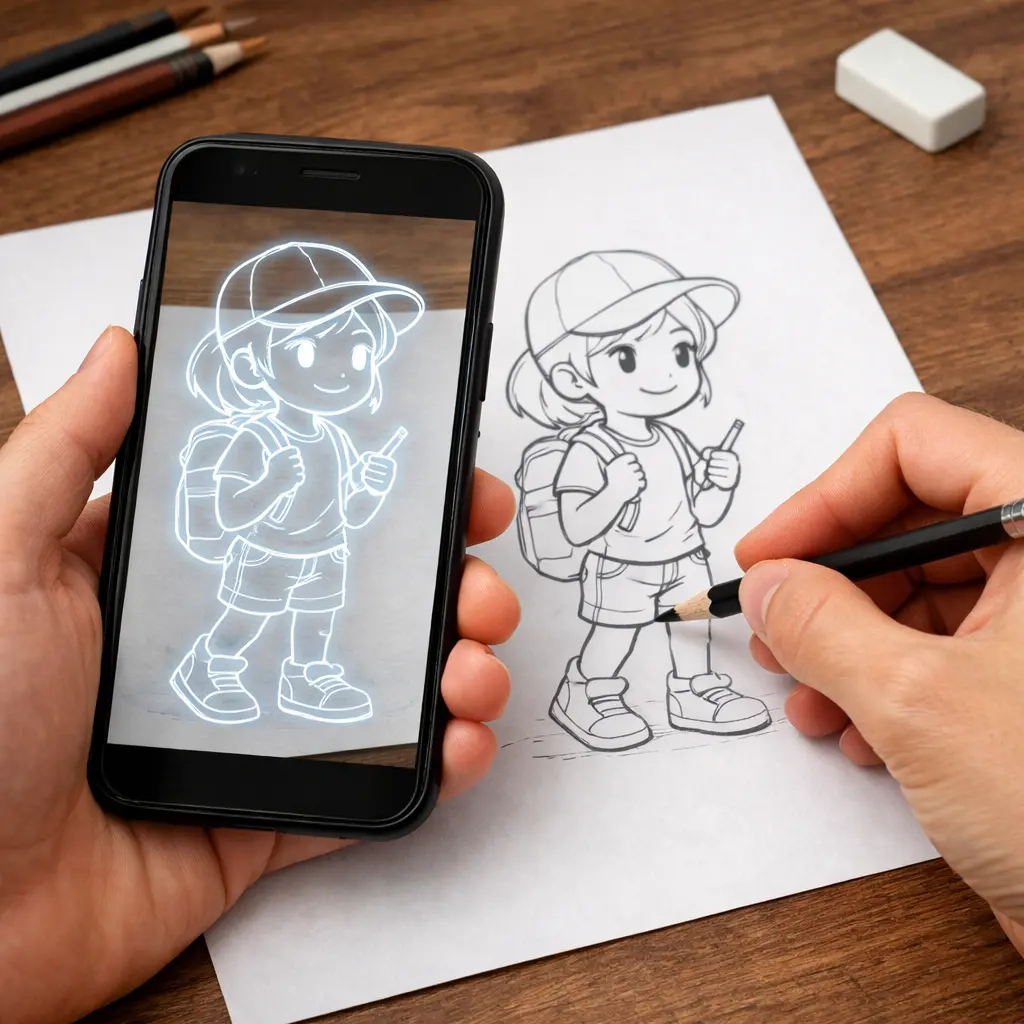
AR Drawing leverages augmented reality to turn any surface into a canvas. By projecting images directly onto paper, the app bridges the gap between tracing and independent artistry, combining guided practice with structured skill-building. With a library of 700+ templates and 200 step-by-step guides, it offers a comprehensive path for every skill level.
Key Features:
- AR-Powered Tracing. Use your smartphone camera to project any template onto paper. Build muscle memory and accuracy by tracing professional sketches in real-time.
- Vast Template Library. Over 700 designs across anime, portraits, and architecture, available in both color and monochrome to suit your style.
- Guided Independence. 200+ structured lessons that transition you from AR-assisted tracing to freehand drawing.
- AI-Driven Customization. Upload personal photos or use the AI Sketch Generator to turn any idea into a traceable outline tailored to your skill level.
- Process Capture. Record your drawing sessions to track your progress or share your time-lapse creations with the world.
Website: ar-drawing.com
Price: 9$/week
Pros
Accessible for all levels.
The app works for complete beginners and more experienced artists looking to transfer sketches to paper faster.
Custom photo upload.
Gallery photos can be imported and used as tracing references.
Time-lapse recording.
The drawing process can be recorded and shared on social media.
Easy to use.
Multiple reviewers describe the interface as simple and user-friendly, even for children.
Cons
Aggressive subscription prompts.
This is the most common complaint. Many users report being unable to get past the onboarding without repeated subscription pop-ups that are difficult or impossible to dismiss.
Severely limited free content.
Uploading personal photos, accessing most lessons, and using core features all require a paid subscription.
Excessive and unskippable ads.
Long ads appear frequently, including immediately after launch and between basic actions.
ShadowDraw
Platforms: iOS (iPad only)
ShadowDraw is a guided learning app designed exclusively for iPad and Apple Pencil. It mirrors traditional art education by requiring each stroke to be mastered before the next step unlocks, ensuring progress is both deliberate and grounded in fundamentals. With over 2,000 lessons led by professional artists, it offers beginners a clear, disciplined, and effective path to mastering the craft.
Key Features:
- Step-by-Step Guided Lessons. Each drawing breaks down into small, sequential steps that unlock one at a time.
- 2,000+ Hand-Drawn Tutorials. Lessons cover a wide range of subjects: anime, portraits, animals, architecture, nature, and more.
- Two Learning Modes. Art Teacher Mode selects brushes and colors for you so you can focus on technique. Sketch My Way lets you choose your own tools for more creative freedom.
- Daily Practice System. Short, beginner-friendly lessons help you build a consistent drawing habit without feeling overwhelmed.
- Apple Pencil Integration. The app is designed exclusively for Apple Pencil, so you practice real pen control: line weight, shading, and precision.
- Family Sharing. A ShadowDraw+ membership covers everyone in your household, each learning at their own pace.
Website: shadowdrawapp.com
Price:
- 7.99$/monthly
- 49.99$/yearly
Pros
Effective for beginners.
Visible skill improvement appears within days, even for those with no prior drawing experience.
Strong lesson quality.
The step-by-step structure teaches fundamentals like muscle memory, line control, shapes, and animal anatomy in a clear, progressive way.
No setup required.
The app opens and starts immediately, with no preparation needed before each session.
Wide subject range.
Portraits, animals, landscapes, and fantasy subjects are all available within the lesson library.
Works across age groups.
Teenagers, adults, and older users report equally accessible experiences, making it practical for family use.
Cons
Limited free content.
The vast majority of the library locked behind a subscription.
Finger use is difficult.
Without an Apple Pencil, the experience is significantly harder, which limits accessibility for users who don't own the accessory.
ArtEasy
Platforms: iOS
ArtEasy is an AR drawing assistant that overlays any image onto your canvas via your smartphone camera. By pairing precision projection with structured lessons on form, proportion, and technique, it transforms simple tracing into a comprehensive learning path. The goal isn’t just to copy lines, it’s to build lasting artistic skills.
Key Features:
- AR Projection Anywhere. Cast sketches onto paper, walls, or tables to refine hand control and accuracy in real-time.
- 500+ Curated Templates. Explore a vast, growing library featuring anime, portraits, anatomy, tattoos, architecture, and more.
- Custom Image Upload. Instantly convert your photos into traceable outlines and save them to a personal library for future practice.
- AI Sketch Generator. Create unique references on the fly by simply typing a description.
- Step-by-Step Drawing Lessons. Master everything from fundamental shapes to advanced compositions through guided, professional tutorials.
Website: arteasy.app
Price:
Pros
Effective for tracing personal photos.
The ability to upload and trace your own images is consistently praised as the app's strongest feature.
Quality lessons.
The structured lesson library receives positive mentions across multiple reviews, covering a range of subjects and skill levels.
Clean interface.
The app's design feels more appealing than competing apps, making it comfortable to navigate.
Accessible for younger audiences.
Multiple reviewers note the app works well for children and teenagers learning to draw.
Fair and affordable pricing.
Compared to similar apps in the category, paying subscribers find the subscription cost reasonable.
Cons
Gallery photo import requires a subscription.
This is the most common complaint. Importing personal photos sits behind a paywall.
Limited free content.
The number of freely accessible templates feels too small, particularly across individual categories.
Da Vinci Eye
Platforms: iOS, visionOS, Android
Da Vinci Eye is a digital Camera Lucida, a tool relied on by masters for centuries, reimagined as a powerful AR app for the modern artist. By overlaying any reference directly onto your canvas, it allows you to lock in proportions, verify accuracy, and deconstruct complex subjects into manageable steps. While most AR apps target basic beginners, Da Vinci Eye is built for those ready to sharpen their craft across any surface or scale.
Key Features:
- AR & Classic Modes. Anchor your image to a fixed physical point to move your device freely without losing alignment, or switch to Classic mode for a streamlined lightbox setup.
- Strobe Tool for Shading. Toggle between your reference and canvas in real-time to compare color values, making it significantly easier to place accurate highlights, mid-tones, and shadows.
- Tonal Layer Breakdown. Automatically separate any image by color value. Overlay layers individually to turn intricate shading into a clear, step-by-step process.
- Patent-Pending AR Lessons. Convert personal photos into structured shading tutorials, bridging the gap between guided tracing and independent skill mastery.
- Time-Lapse Recording. Capture your entire creative process directly within the app for easy sharing or portfolio building.
- Inspiration Feed. Browse reference photos from the community or contribute your own to keep your creative momentum going.
Website: davincieyeapp.com
Price:19.99$ for Android, and free for iOS with the option to upgrade.
Pros
Works across a wide range of creative fields.
Effective for building fundamental skills.
The AR tracing function helps beginners develop proportion, perspective, and line accuracy, with several users noting they gradually reduced their reliance on the app as their skills improved.
Fast and attentive customer support.
Multiple reviewers confirm support responses arrive within an hour, with issues resolved promptly.
Cons
Learning curve on first use.
Some users note that the projected image can shift slightly during use, requiring manual realignment.
ArtWorkout
Platforms: iOS, Android
ArtWorkout is a drawing and painting trainer app built around short, structured sessions. Unlike most drawing apps, it goes beyond guided tracing by analyzing your work and providing feedback that helps you understand where your technique actually stands.
Key Features:
- Stroke Accuracy Tracking. Analyze every line you draw against the intended result.
- Line Quality Assessment. Evaluate the steadiness, cleanliness, and expressiveness of each stroke .
- 3,000+ Step-by-Step Lessons. Work through bite-sized tutorials broken into 10–30 steps each, covering sketching, doodling, painting, and handwriting across a wide range of themes and difficulty levels.
- Real-Time Multiplayer Mode. Draw together with other users around the world in live sessions.
- Progress Score System. Track improvement over time with a scoring system that reflects both accuracy and technique, giving you a clear picture of how your skills develop.
Website: artworkout.app
Price:
- 7.99$/monthly
- 59.99$/yearly
Pros
Effective for skill improvement.
The app produces genuine progress in drawing ability, including for those who started with no prior experience.
Enjoyable concept and interface.
The core idea of guided tracing and multiplayer drawing attracts strong interest, and the experience is fun when content is accessible.
Multiplayer drawing mode.
Drawing alongside other users in real time.
Suitable for all ages.
The app works for children and adults alike, making it practical for family use.
Cons
Excessive and intrusive ads.
Free users face frequent ads between drawing sessions, even though content access remains heavily restricted.
Multiplayer bots.
Multiplayer sessions are populated with bots rather than real players, undermining the social appeal that drew many to the app.
No creative freedom.
The app requires staying strictly within guided lines, with no room for personal additions or creative deviation.
Sketchar
Platforms: iOS, Android
Sketchar is an all-in-one AR drawing platform built around patented technology that projects any image onto paper, walls, or fabric via your smartphone camera. By merging precision AR tracing with a professional-grade digital canvas and a global community.
Key Features:
- Seamless AR Projection. Cast any image onto your chosen surface and trace with confidence. Its advanced tracking allows for stable projection without the need for specialized phone holders or bulky equipment.
- 750+ Professional Lessons. Access a massive library covering everything from anime and portraits to anatomy. Each lesson includes expert text guidance and a personalized growth plan tailored to your progress.
- Full-Featured Digital Canvas. Create from scratch using a professional toolset, including layers, stroke smoothing, image imports, and a unique Liquid Brush.
- AI-Powered Customization. Beyond built-in templates, use AI tools or custom uploads to transform any photo or idea into a traceable sketch for fan art or original projects.
- Global Community. Share your portfolio with millions of creators, join weekly themed contests, and gain inspiration from an active, supportive network of artists.
- Gamified Progress Tracking. Stay driven with a rewards-based system that tracks your creative milestones, turning daily practice into a rewarding journey of achievement.
Platforms: iOS, Android
Website: sketchar.io
Price:
- 14.99$/monthly
- 69.99$/yearly
Pros
Effective for beginners.
The AR tracing feature genuinely helps people with no drawing background produce results they couldn't achieve on their own.
Free daily lessons.
Free users get access to a limited number of sketches at no cost, spanning animals and other categories.
Community.
The app includes a creative community feed where users can share and browse artwork, which some find motivating.
Cons
Poor zoom functionality.
The app offers limited zoom control during drawing sessions.
Content quality has declined over time.
Long-term users note that features previously available for free have been progressively moved behind a paywall with each update.
AR Easy Draw
Platforms: Android
AR Easy Draw is a camera-based drawing app that uses augmented reality to overlay images onto any surface, letting you trace them directly through your phone screen. It covers the full range from first-time beginners to practiced artists, with a library spanning popular subjects like anime, cartoons, animals, and fan art.
Key Features:
- Camera-Based AR Drawing. Place your phone on a stand, look through the screen, and trace any image projected onto your surface.
- Tiered Drawing Lessons. Access structured lessons across three difficulty levels, each offering progressively challenging exercises that build skill gradually without overwhelming beginners.
- Large Template Library. Browse a broad collection of subjects including anime, chibi, animals, food, flowers, vehicles, and more.
- Advanced Drawing Controls. Adjust opacity, zoom in and out, toggle the flash, and record a video of your entire drawing process directly within the app.
- Progress Tracking. Monitor your development through a personal profile that logs time spent drawing and lessons completed, giving your practice sessions a clear sense of forward momentum.
Platforms: iOS, Android
Website: play.google.com/store/apps/details?id=com.draw.sketch.ardrawing.trace.anime.paint
Price: $7,5/week
Pros
Genuinely effective for beginners.
Many users with no prior drawing experience report significant improvement and real results after using the app.
Wide variety of templates.
The library covers anime, cartoons, cute characters, people, animals, and fan art across multiple style categories.
Practical tracing tool.
Placing the phone over paper and tracing the projected image works well enough for many users to produce drawings they are proud of.
Free to use.
The core tracing functionality is accessible without payment.
Cons
Excessive and intrusive ads.
This is the single most common complaint across the reviews. Ads appear on launch, between every action, and sometimes block the drawing area entirely with no visible close button.
Gallery import moved behind a paywall.
A recent update locked the ability to draw from personal photos behind a subscription, which was previously free and is cited as the most useful feature for many users.
Trace Drawing App
This is an AR and AI-powered drawing app that combines tracing, structured lessons, and AI image generation in a single workspace. It projects any image onto a real surface through your camera, letting you trace it directly in real space rather than on a screen.
Key Features:
- AR Drawing and Tracing. Project any image onto paper, canvas, or a wall through your phone camera and trace it in real time, with adjustable placement, zoom, and rotation for accurate alignment.
- Custom Image Import. Pull in photos, downloaded images, or your own digital designs from your library, then combine them with AR projection for precise, reference-based drawing.
- Step-by-Step Drawing Lessons. Follow structured guides that progress from basic shapes to more advanced techniques, fully integrated with AR drawing for an interactive learning experience.
- AI Image Generator. Describe any concept in text and the app generates original artwork within seconds, ready to use as a tracing reference or creative starting point.
- In-App Image Search. Find high-quality reference images directly inside the app without switching to a browser, keeping your drawing workflow uninterrupted.
- Session Recording. Capture the entire drawing process from start to finish and export or share it with a single tap.
- Coloring Tools. Add color to finished tracings or sketches using palettes, gradients, and fill options built directly into the app.
Website: https://play.google.com/store/apps/details?id=tracesketch.draweasy.traceanything
Price: $9,5/week
Pros
Core tracing functionality works well.
The ability to import any image from the gallery and trace it directly through the camera delivers reliable results for most users.
Very few ads.
Compared to competing AR drawing apps, the ad frequency is significantly lower, which many users highlight as a major advantage.
Works offline.
The app functions without an internet connection, which adds practical flexibility.
Easy to use.
The interface is straightforward enough for beginners, children, and users with no prior drawing experience.
Scalable drawing size.
The ability to draw at any scale, including larger formats, is noted positively by users working on embroidery, murals, and canvas projects.
Cons
Frequent camera refocusing
The lens refocuses every time a hand or pencil enters the frame, interrupting the tracing process and frustrating users mid-drawing.
Rapid battery drain
Some users report the app draining battery rapidly and causing the device to overheat during extended sessions.
How We Selected the Apps
This review is based on an analysis of publicly available information about AR drawing tools, including ratings and user reviews in the App Store and Google Play, declared features for tracing and drawing assistance, lesson structure and learning progression, pricing models, and compatibility with different devices. It is important to note that we do not accept payment for including apps in this ranking. Prices, features, and supported platforms may change over time. The free and premium content boundaries described in this article reflect information available at the time of writing. Before installing an app, we recommend checking the most up-to-date information on the developers' official pages in the app stores. Subscription prices listed in this article are approximate and may vary depending on your region, platform, and the time of purchase. For the most accurate and current pricing, please refer to the app's official page in the App Store or Google Play.
.webp)







.webp)